
The full guide
The 30-second version
Profit Forge answers one question: "what should I craft, flip or salvage right now to make the most silver?", using live market data from every royal city, Brecilien and the Black Market. The server does the heavy math every few minutes, so the answers are already waiting when the page loads, personalised to your premium status, your Destiny Board and your tax settings.
Getting in
Open the app and sign in, with Discord or Google when those buttons are offered, or by pasting your access token. Your filters and character profile are saved per account, set them once, they follow you to any browser.
Linking Discord or Google to your account (Menu → Account) is also your safety net: lose your token and signing in with the linked account simply issues a fresh one. The same panel has a Reset token button for when you want every old copy invalidated on purpose.
The calculators
The top-level toggle picks a family: Craft, Flip, or Foundry, and the tabs below it pick a calculator.
Gear crafting
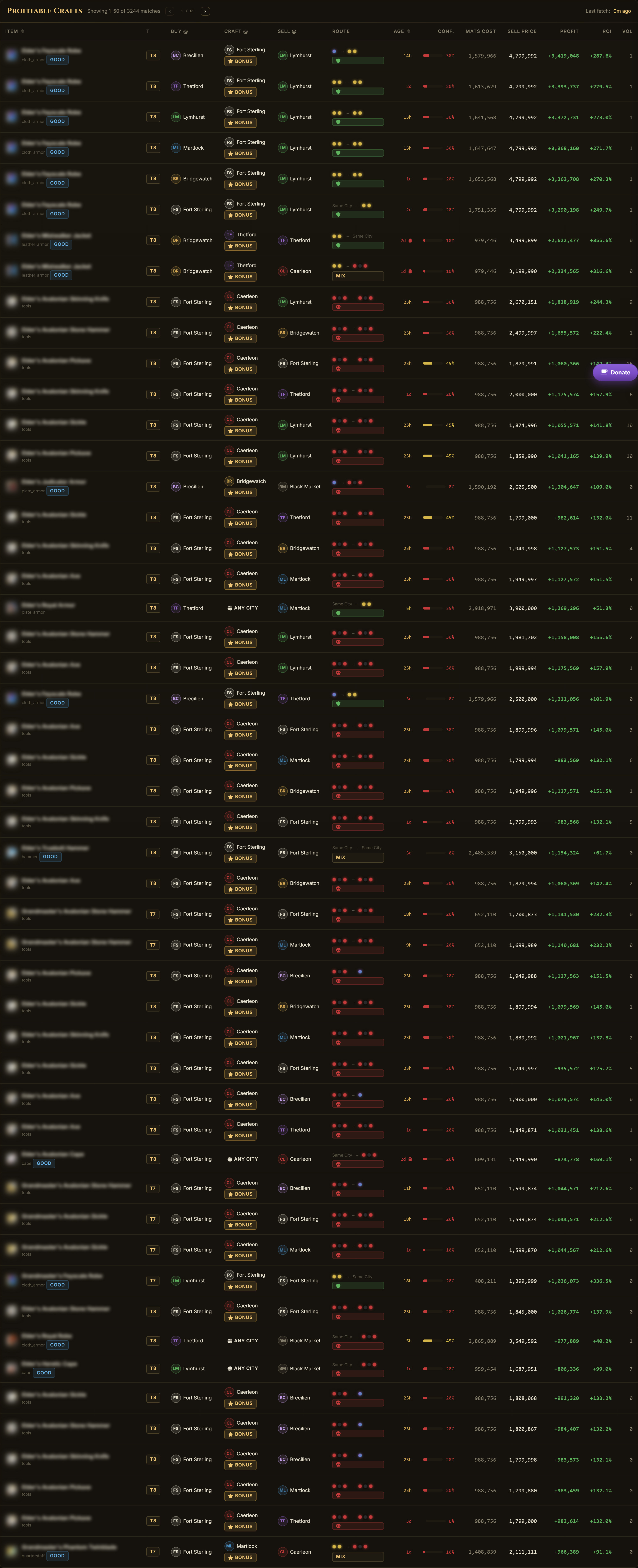
For every craftable piece of gear, the best (buy materials here → craft → sell there) combination: material cost, sell price, profit, ROI, sold volume, and how fresh every price in the math is. City crafting bonuses and your return rate are applied, and the top results are precomputed server-side, the page is instant even though roughly a million combinations were evaluated for you.
Refining
Raw resources in, refined materials out, same math, including the refining city bonuses and your return rate. Often the steadiest low-attention silver in the game.
Alchemy
Potions with batch yields handled correctly: one craft produces five potions, and the math prices the craft action against the five-unit sale, not one.
Cooking
Meals and their markets, batch yields included. Pairs well with the Fish Economy tab below when you fish your own inputs.
Miscellaneous
Everything craftable that isn't gear, refined goods, potions or food: tools, bags, capes and the long tail.
Flip (incl. Non-Craftable)
Buy a finished item in one city, haul it, sell it in another. The Non-Craftable tab covers things you can only trade, resources, mounts, artifact cape tokens. Route safety (safe/danger zones) is shown per row.
Black Market
The Black Market is an NPC buyer in Caerleon whose orders rotate constantly: this is where the fastest silver usually hides, and most tools ignore it. Profit Forge tracks it natively for both crafting to it and flipping to it. You choose the revenue basis: sell instantly into the NPC's buy order, or list your own sell order at the BM.
New to the Black Market? Read the full walkthrough: Black Market flipping, how it works and how to profit.
Salvage
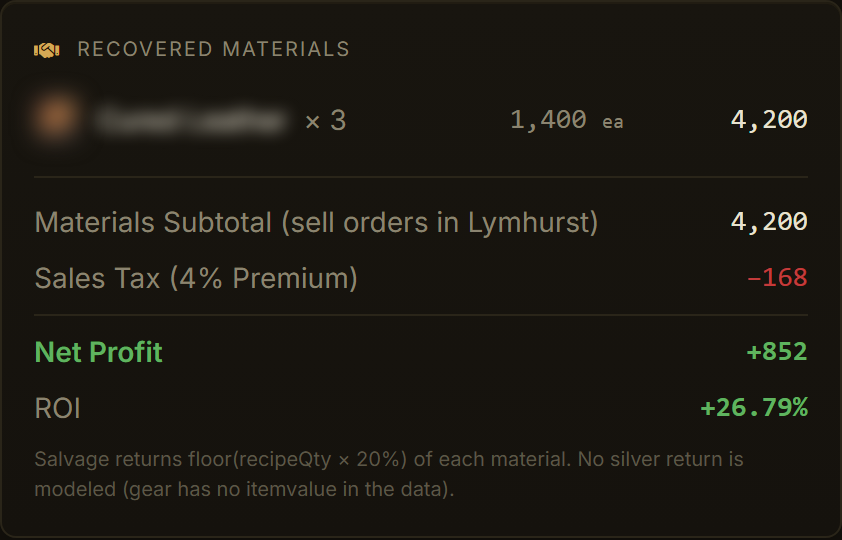
Buy cheap gear, salvage it, sell the recovered materials. A surprisingly consistent money-maker most players ignore, the table prices the gear you'd buy against the material value that comes back out, with your salvage return rate applied.
Melding
Artifact melding expected value: reagent cost against the weighted outcome pool, with the best and worst case shown per combination. An EV calculator: single melds will run over or under, and the table says so.
Transmute
Reagent, royal sigil and map tier-ups: input cost plus the silver fee against the output's price.
Fish Economy
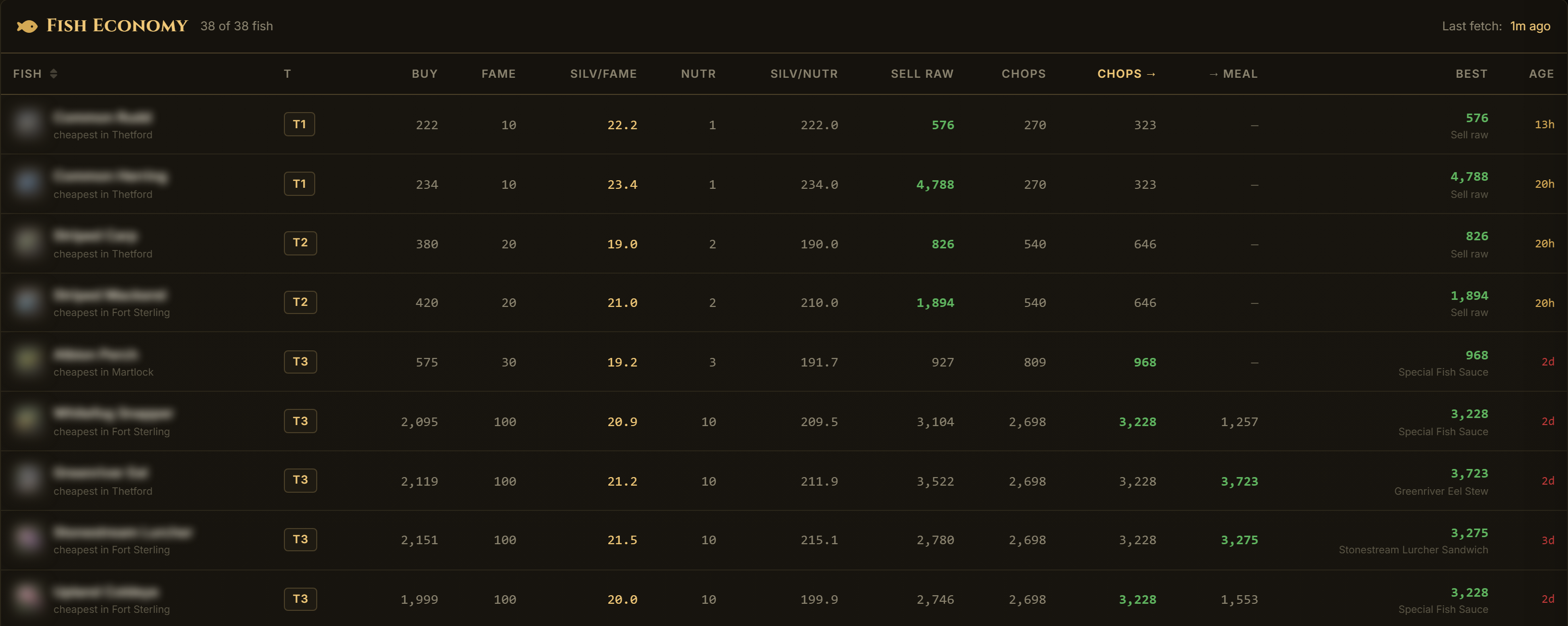
One row per fish: the cheapest fame per silver (eating for progression), the cheapest nutrition per silver, and whether each fish pays best sold raw, chopped, turned into sauce, or cooked into its meal: the winner named per row.
Why the numbers can be trusted
Realistic Revenue (the ⚓ anchor)
When the cheapest listed ask is a troll listing, a 15 M ask on a 15 k potion: profit is computed from the trade-weighted historical price instead, and the row shows an ⚓ anchor with both numbers. Items with no reference anywhere are hidden rather than shown with unverifiable profit. On by default; without this, every market tool happily projects fantasy profits off one bait listing.

The ghost-price check
Realistic Revenue guards what you sell; this guards what you buy. A cost price that is both stale (12+ hours) and far cheaper than the newest fresh price in other cities is probably a ghost: a dead order that is already gone, making the row's profit look better than it is. Always on: flagged rows get a small ⚠ next to their Age, and the detail view shows the fresh cross-city price beside the suspect one. Display-only; it annotates, never changes the math.
Age & Confidence
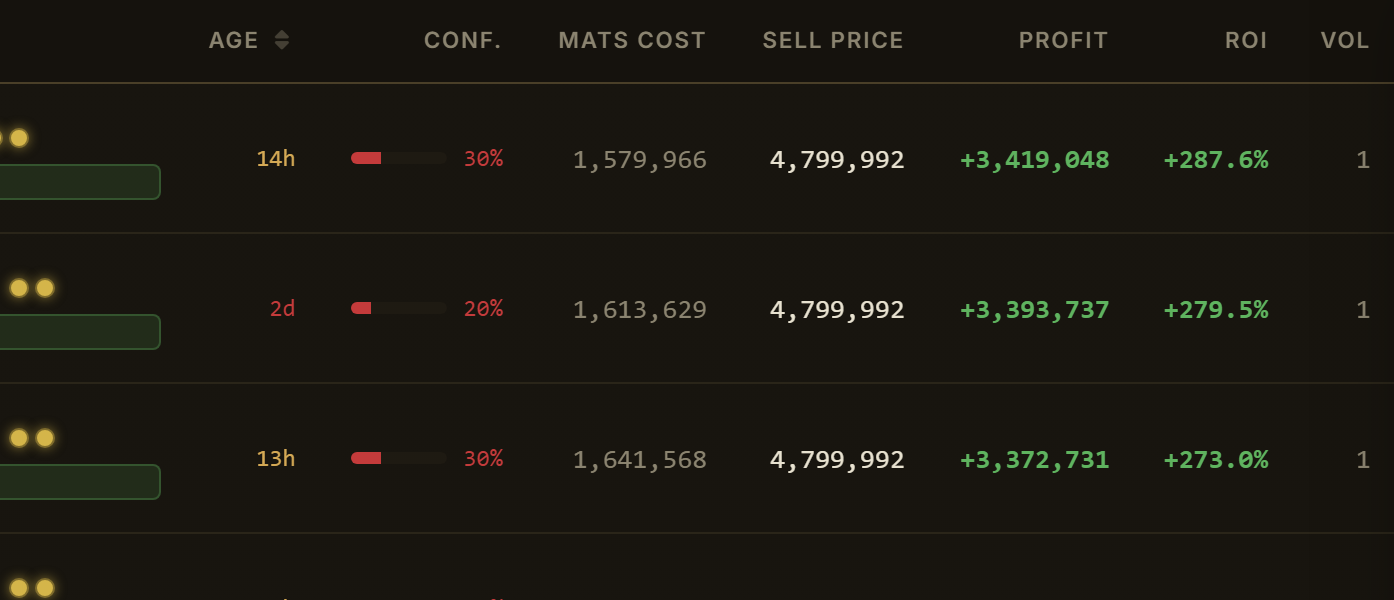
Every row shows the age of the stalest price used in its math (hover splits it into materials vs sell side) and a confidence score. You always know whether you're looking at data from one minute or one day ago. A tool that hides staleness is a tool that costs you silver on the one craft you actually commit to.
Freshness also shapes the ranking: a stale sell price decays a row's sort score (roughly two-thirds weight at a day old, a quarter at five days), so old markets sink below fresh ones and only resurface when the margin genuinely compensates for data nobody has confirmed recently. The rows themselves stay: thin markets are often days between scans, and that's real information too.
Confidence is built from the same freshness curve (half the score) plus trading volume (the other half), sell-price age counts in full, material age at half rate. And when a row has several acquisition methods (direct vs enchant-up, quality combos), the Method Pick filter decides which one leads: Best Profit (default) or Best Confidence, the freshest, most-verified method even when a staler one promises more. Either way the other method's profit, cost, sell price, age and confidence are shown right on the row, so the trade-off is never hidden.
The ↳ alternative row
When an item can be acquired more than one way, crafting at the target enchant directly vs enchanting up from a lower one, or the quality-reroll paths: the table shows the picked method as the main row and the other method as an indented ↳ row right beneath it, aligned to the same columns: its cost under Mats Cost, its profit under Profit, and crucially its own data age and confidence. Two methods for the same item can stand on very different data: the enchant path might rest on 5-day-old reagent prices while the direct craft was confirmed 30 minutes ago. A crimson flag on the ↳ row means exactly that: the alternative's prices are much fresher than the picked one's.
Which method leads is your call: the Pick control above the table (also under Filters → Method Pick) defaults each row to the most profitable path, or to the best-verified one, and either way the road not taken stays visible, numbers and all.

The advanced modes
Three whole calculators live in the app's "Calculator Modes" drawer. They're off by default; each one exists to stop you overpaying.
Our recommendation: keep Cross-City Shopping and Enchant-Up Comparison on all the time. Neither ever hides a result: they only surface cheaper paths the plain view can't see, and the rows tell you when the plain path was already best. Quality Reroll is the situational one; switch it on when you're hunting Outstanding-and-up gear.
Cross-City Shopping
Normally the calculator prices your whole recipe in one Buy Materials city. That's how most people actually shop, but it leaves silver on the table, because the cheapest planks are rarely in the same city as the cheapest metal bars. Turn on the Cross-City Shopping and each material is priced in whichever city sells it cheapest, across every city you haven't excluded. The row's Buy column becomes a "Multi" badge; open it and you get a literal shopping list: each material, its source city, unit price, and line total.
The detail view also keeps you honest about whether the trip is worth it: it computes the best single city, the cheapest one where every material is actually listed, and shows your multi-city total against it as a savings line. If the savings are small, buy it all in one place and keep your travel time. The route map redraws too: every source city fans into the craft node, and route safety becomes the union of every leg, one red-zone leg marks the whole plan dangerous.
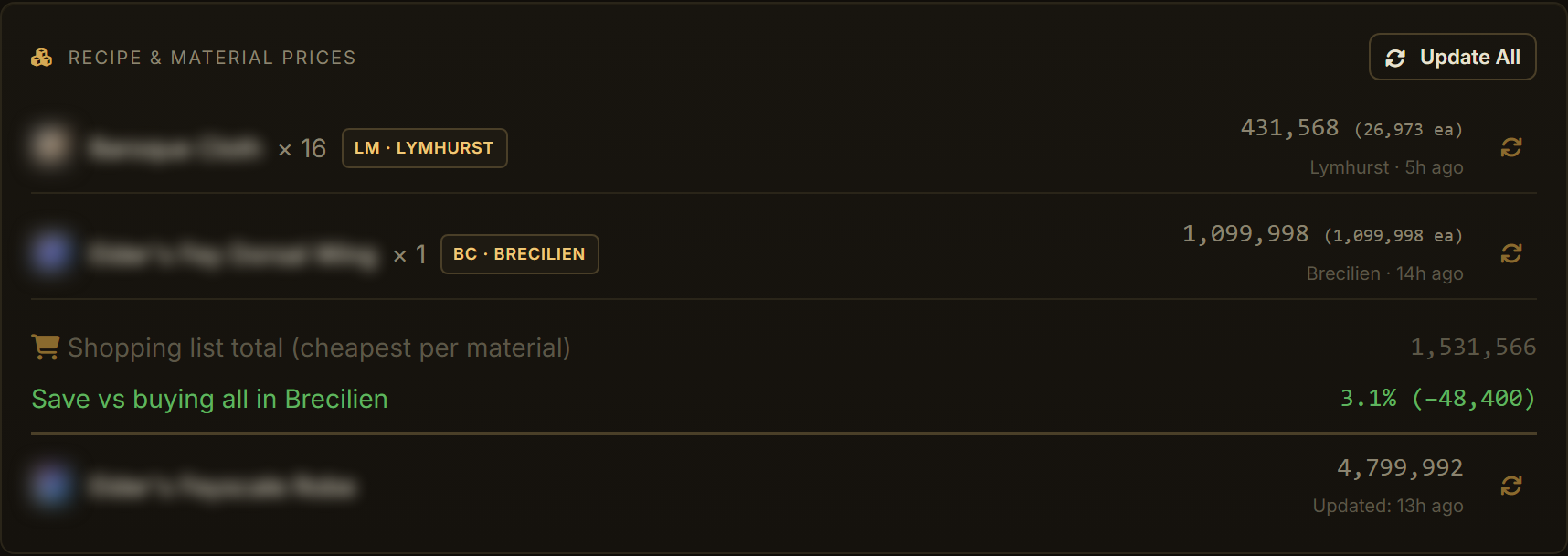
Limits, plainly: recipe tabs only (Gear, Refining, Alchemy, Cooking, Black Market crafting), off by default. The Black Market is never a material source: it's an NPC buyer, it sells nothing. Materials are priced at Normal quality, and the freshness column shows the oldest price across all source cities, so a bargain resting on a day-old listing announces itself.
Where to find it: Filters → Calculator Modes → Cross-City Shopping.
Enchant-Up Comparison
A .2 item can be made two ways: craft it at .2 directly, or craft the .0 or .1 version and enchant it up with reagents (Runes to .1, Souls to .2, Relics to .3). Which is cheaper swings with reagent prices, and almost nobody checks. This mode checks on every row: for each .1/.2/.3 gear target it prices the direct path and every lower starting level: craft cost with your return rate and station fee applied (or the buy price, on Flip), plus the full reagent chain to bridge the gap: and badges the row with the cheaper method: "Craft+Ench↑" or "Craft direct". A sub-line under Profit shows the losing method and the gap, so you see what the choice was worth.

Sometimes reagents spike and "direct" wins, the badge says so. Open the row and a Direct / Enchant selector shows both paths' full cost breakdowns with per-reagent prices; "Update all tiers" re-fetches everything at once. The recommended method can flip after a refresh. That's the point.
Limits: gear only.1-.3 targets only (.0 and .4 have nothing to compare), and it needs .1-.3 selected in the Enchantments filter to have anything to show. Revenue is identical on both paths: same finished item, same sell city: so this is purely a cost race.
Where to find it: Filters → Calculator Modes → Enchant-Up Comparison.
Quality Reroll
Outstanding gear sells for more than Normal. You can get there by luck: or by paying the artificer to reroll quality, which costs silver based on the item's value. Quality Reroll does the expected-value math: for each item it evaluates every target quality you've selected via up to four routes, craft or buy at that quality directly; craft at Normal and reroll up; or, with Enchant-Up also on, do either at a lower enchant level first (where item value, and therefore the reroll fee, is smaller) and enchant up afterwards. One row per item, badged with the winning combination. Open the row to see every viable combination and swap between them.

The reroll cost isn't a guess, but it is an expectation. Each reroll costs item value × 3.975 × a quality multiplier, and the outcome is random. We solved the expected total cost to reach at least each quality from Normal: ×1.00 of the base fee for Good, ×2.43 for Outstanding, ×4.94 for Excellent. Real sessions will run over or under: that's what "expected" means, and the UI says so too.
Limits, plainly: the reroll odds are community-measured, not official: approximate, and flagged as such. Masterpiece is never targeted (0.1-0.5 % chances make its EV garbage; a lucky Masterpiece on the way counts as success). Gear only, and only items with a derivable item value. Combine with Enchant-Up to unlock the two combined routes.
Where to find it: Filters → Calculator Modes → Quality Reroll.
Price & volume charts
Every detail popup carries a price and volume chart: average sell price as a line, units sold as bars, for the item and every material, reagent or salvage output in the calculation, each gets its own tab, priced in the city the calc actually used. If a profit figure looks too good, two clicks show whether the sell price is a trend or a one-day spike, and whether anyone actually buys at that price.
Three windows: Today (hourly buckets), Week and 4 Weeks (daily buckets). The ‹ › arrows page the window back through time. Paging within loaded history is instant. When you page past what the server keeps locally (90 days of daily data; hourly only exists for recently traded items), the chart fetches the older stretch straight from the Albion Online Data Project archive and keeps going, measured reach on daily data: about six months. The ‹ arrow only goes dark when an archive fetch returns nothing new: the actual end of recorded history for that item in that city, not us giving up early.
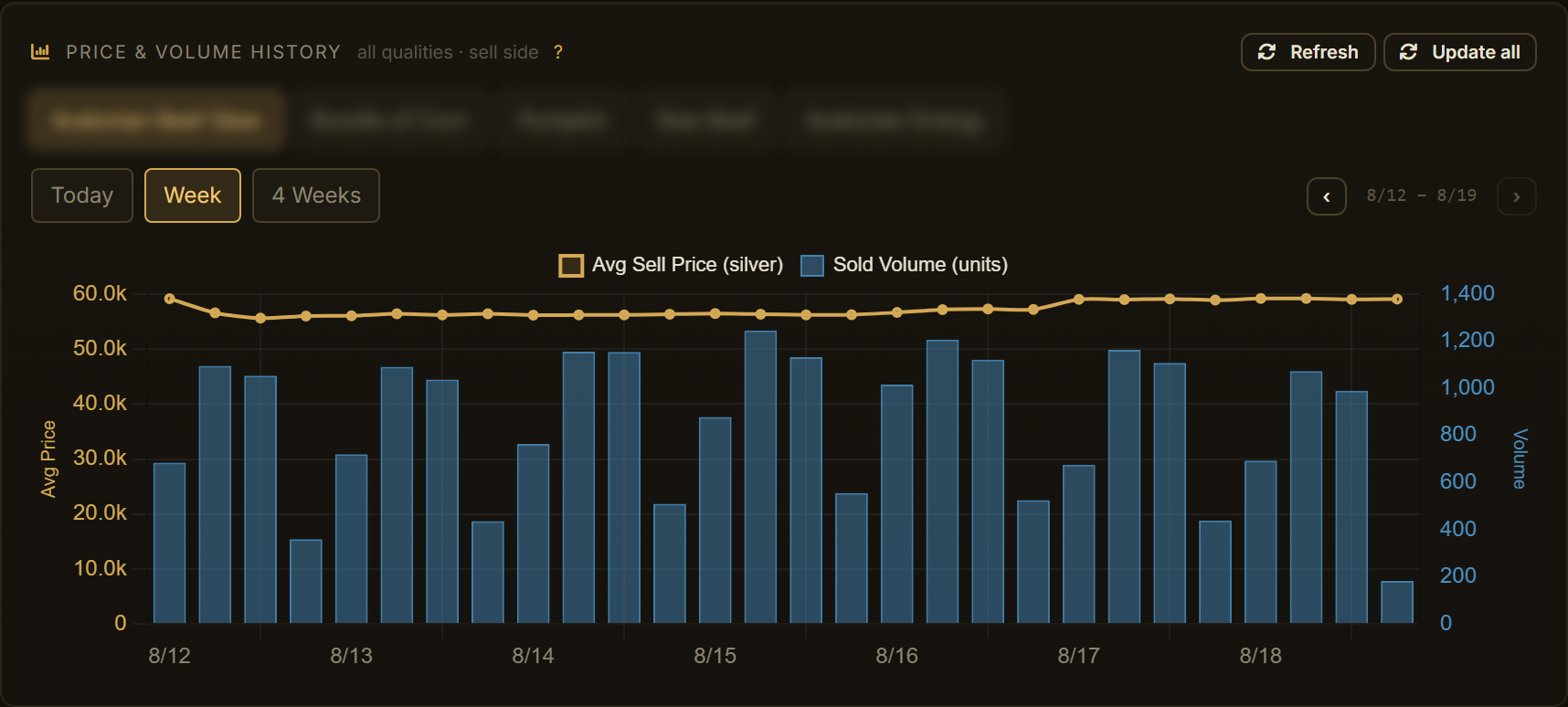
Limits: hourly coverage is only as good as recent trading, a dead item has no Today view and falls back to coarser buckets rather than a blank. Fetched history caches ten minutes per item and city; switching regions clears it: EU history is not NA history.
Market price lookup
Sometimes you don't want a calculator, you want a price. The Market Prices tab (Menu → Market Prices) is a raw lookup: type an item name and get up to five matching items with every city and every quality side by side, cheapest sell order, highest buy order, the age of each price, and daily volume.
Three filters narrow it: Cities (pick just the ones you trade between), Tiers (T1-T8) and Enchants (.0-.4). Tier and enchant filters shape which items match your search, so "broadsword" with T5 selected finds Expert's instead of five Adept's variants.
Raw market data is free, always: this tab is never paywalled. Prices are as fresh as the community's scans; every price shows its age so you never have to take "fresh" on faith.
Where to find it: Menu → Market Prices.
The craft planner
Any craft or flip row opens into a planner: say how many you want, "craft 20 of these": and it turns the recipe into craft actions and a gross shopping list: every material, its city, the side you'll buy on (instant or buy order, per line), and the line totals. Batch yields are respected: 12 potions is 3 craft actions and you'll actually get 15: and the expected return-rate refunds are shown as an info line rather than silently subtracted, because at small counts the variance makes a pre-shrunk list a gamble.
The number that stops you losing silver mid-shop: a material budget per craft, derived exactly from the profit equation, plus a breakeven max price per material. Bought half your stock cheap and the rest is listed higher? The max column tells you the price at which the remaining units stop being worth it. Every auto number is overridable, and overrides survive price refreshes.
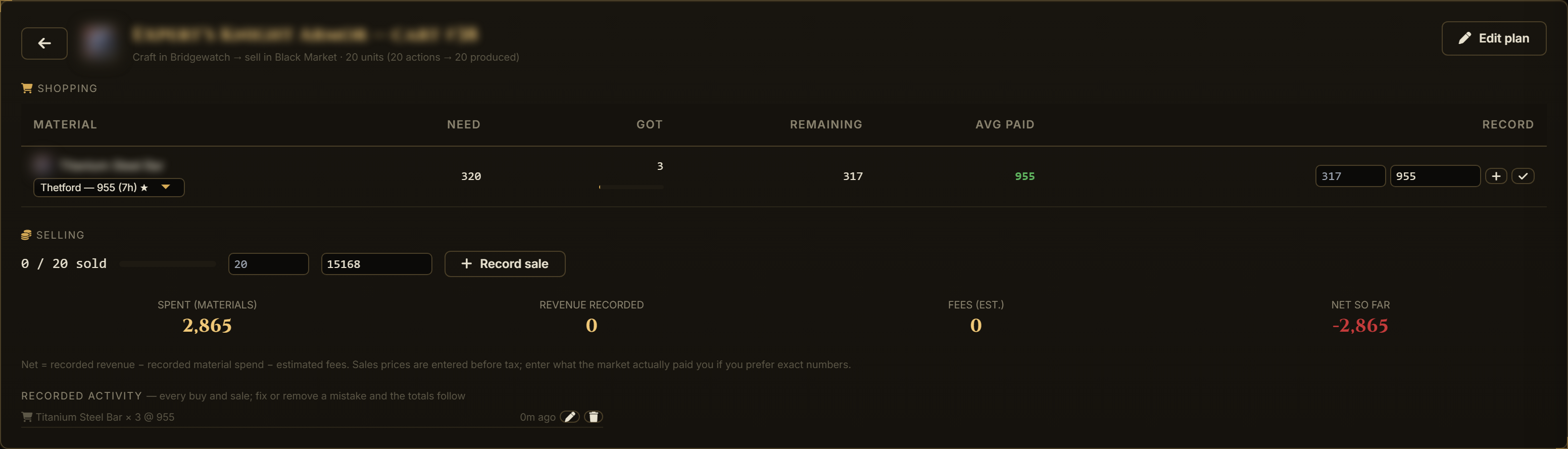
Limits, plainly: the per-material maxima each assume the other materials stay at their current prices, you cannot spend all of them at once, which is why the budget line is the real guardrail. And without public order-book depth (no data source provides it), the planner cannot promise how many units are actually listed below a price: it guides on price, not on fill.
Saved carts open into a full tracking view: record what you actually bought: per material, session by session, at the prices you really paid: and it keeps a running "how much more do I need". Record sales the same way, partially or all at once, and the cart shows your realized profit: recorded revenue minus recorded spend minus estimated fees. Your average paid price turns red the moment it crosses the plan.
Mis-clicked a sale, or recorded 5 when you sold 3? Every recorded buy and sale in a cart's tracking view can be edited or deleted in place: the totals adjust by exactly the difference, and nothing else moves.
Completing a cart writes it into your permanent history, the Stats tab keeps your total recorded profit, the craft/flip split, top items and a day-by-day profit chart, and those numbers survive even if you delete the cart afterwards. The Records tab next to it is the full book: every record with what you paid and where, what it sold for and where, fees and profit, each row editable or deletable, and the whole history exportable as CSV.
Where to find it: open any craft or flip row → Plan quantity. Saved carts live under Carts in the header, click one to track it, the pencil edits the plan.
Your own data feed
Every price in Profit Forge comes from players running the community's Albion Online Data client while they play. Our desktop Launcher (Data Client panel → Download) manages that client for you: sign in with your browser, press Start, done, no command line. It installs the data client itself (or finds the copy you already have), checks that Npcap, the packet-capture driver, is present, shows what it captured and uploaded live, and keeps itself up to date. Tick Follow the game and it starts and stops with Albion Online on its own.
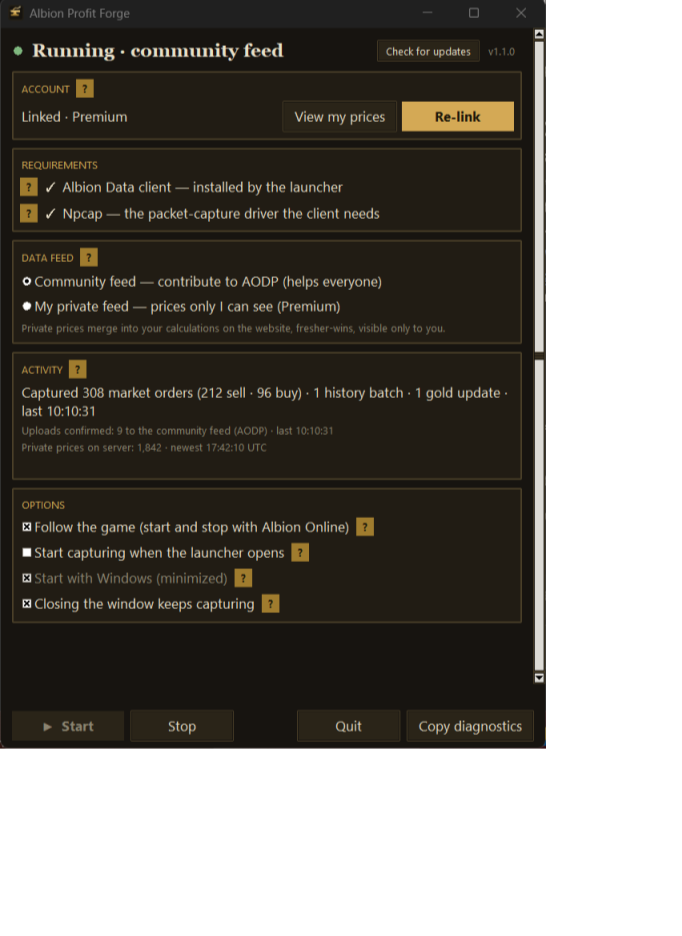
By default your scans feed the community pool (AODP), which helps everyone including you. Premium unlocks the private feed: your scans go to your own account instead, visible only to you, and your fresher prices override the public ones everywhere in the app: your browsing habits stop being public information, and your numbers are as fresh as your own last market visit.
Where to find it: Menu → Data Client.
My Character (Destiny Board)
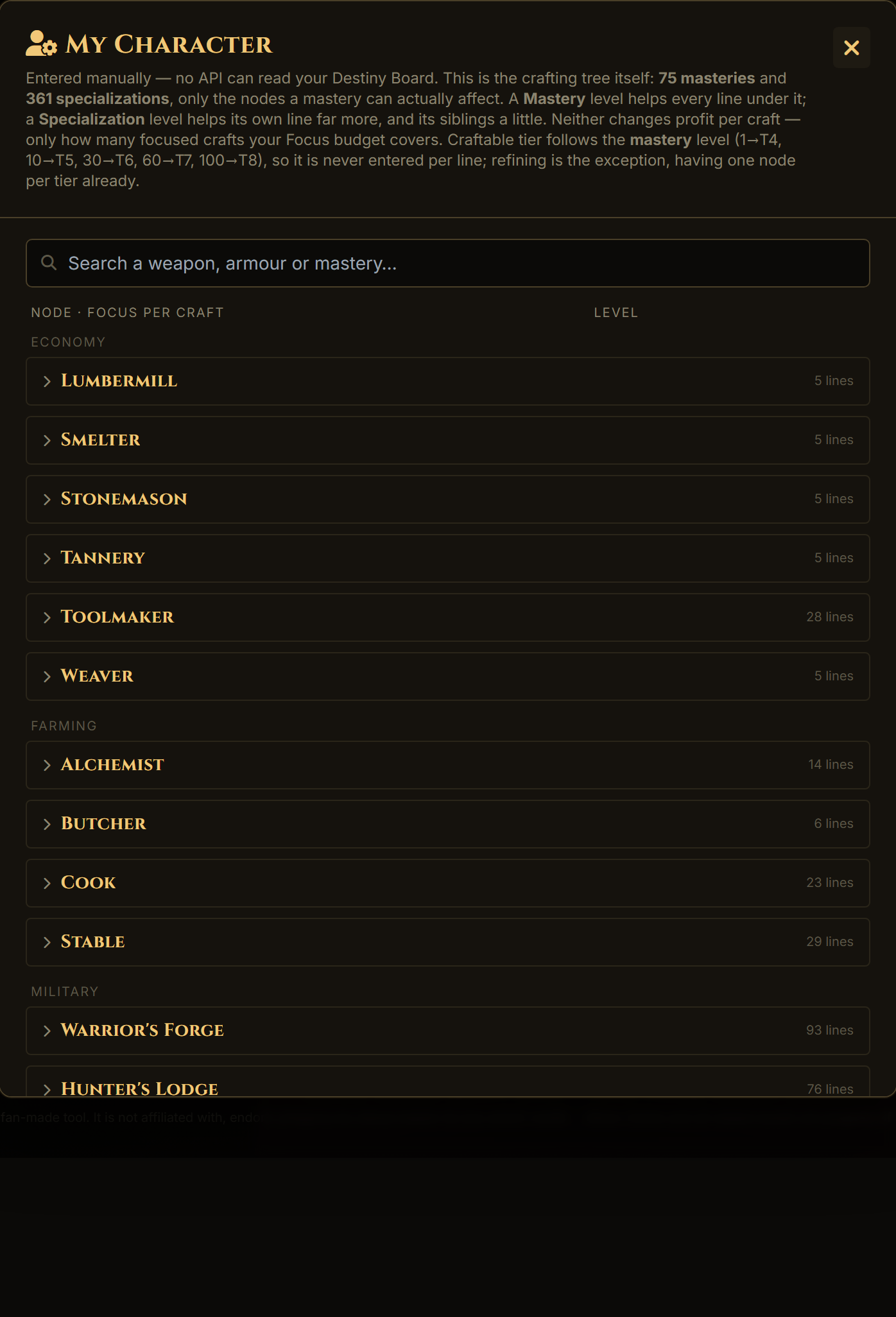
A mirror of the in-game Destiny Board crafting tree: Military, Economy and Farming branches, each station, each mastery, each specialization line: artifact lines included. Set your mastery and spec levels; craftable tiers derive automatically (level 1→T4 … 100→T8), and the focus-cost math uses the real +250 own / +15 sibling / +30 mastery focus-efficiency model. Turn "Use My Levels" off any time to see the market as a generic character without losing your setup.
Filters that stick
Premium status, tax, station fee, cities, tiers (T1-T8, low tiers are opt-in), enchantments, quality targets, route safety, volume floors… all saved per account and restored on login, on any browser.
Always fresh, never reload
The server rebuilds all results every five minutes from live data; open pages hot-swap to the new numbers automatically, a toast tells you. If a detail popup is open, the swap politely waits until you close it.