Know what's worth crafting, flipping, even salvaging. Right now.
Every craft, flip, salvage, meld and transmute in Albion Online,
computed server-side before you arrive, troll-proof, personalised to
your Destiny Board, and already sorted by profit.
What to make, where to buy the materials, where to craft it, bonus
city already picked: where it sells best, how safe the road is, how
fresh every price is, and what you'll pocket. Read one row, go play.
Captured from the live table, the item stays our little secret. Materials from two cities, crafted in Caerleon with the city bonus, sold to the Black Market: +170,427 silver at 47% ROI, and the age shown is the stalest price in the whole calculation, about three hours. Rows like this are sitting in the app right now.
The search runs backwards. On purpose.
Every other calculator works the same way: pick an item, pick a city,
get one number. If the real answer was "craft something else entirely",
you'd never find out.
Every other tool
You choose an item. It computes that item's profit. Repeat until
you get bored or lucky.
Profit Forge
The server computes every combination first: roughly 1,000,000
buy-here → craft → sell-there routes across 8 markets, Black Market
and Brecilien included. You open a table that's already sorted by
profit. Row one is the answer.
1
Prices stream in.
Live market updates from the Albion Online Data Project land
continuously: batched roughly once a second.
2
Everything gets recomputed.
Every 5 minutes the server rebuilds the entire result set from
those prices: eleven calculators, three regions, ~1,000,000
combinations.
3
You start at the top.
Filter to your cities, your tiers, your Destiny Board. The winners
are already sorted; the losers never load.
No loading spinner. No "calculate" button. The
math finished before you got here.
The Gear table on load; nothing was clicked. Row one is today's best craft.
Stop researching. Start profiting.
The homework is the job nobody pays you for: checking item after item,
city after city, redoing the math every time the market moves. Profit
Forge does that homework: all of it, every 5 minutes, so your play
time goes into crafting and trading, not into tabs and spreadsheets.
Never wonder what's worth crafting, every option is already ranked against every other
Never trawl markets city by city, all 8 are compared on every single row
~1,000,000 combinations checked for you, so you check one table
Eleven calculators. One question.
"What makes the most silver right now?", asked eleven different ways.
Every tile links to the full guide, no login needed.
There's more: a craft planner with per-material max prices
("craft 20 of these" →),
multi-city shopping, enchant-up math, reroll EV, and about six months of
price history.
See the advanced modes →
Three modes that stop you overpaying
Off by default, one toggle each. Every one exists because the obvious
way to buy costs more than it should.
Cross-City Shopping
The cheapest planks are rarely in the same city as the cheapest
metal bars. Turn this on and every material is priced in whichever
city sells it cheapest: the row opens into a literal shopping
list: each material, its source city, unit price, line total. A
savings line compares it against the best single city, so if the
trip isn't worth it, the page says so.
One red-zone leg marks the whole route
dangerous, and the freshness column shows the oldest price used,
a bargain resting on a stale listing announces itself.
Read how the math works →
Enchant-Up Comparison
A .2 item can be crafted directly: or crafted at .0 and enchanted
up with reagents. Which is cheaper swings with reagent prices, and
almost nobody checks. This mode checks on every row: it prices the
direct path and every lower starting level, then badges the cheaper
method and shows what the choice was worth.
Sometimes reagents spike and "direct" wins.
The badge says so. That's the point.
Read how the math works →
Quality Reroll
Outstanding gear sells for more than Normal, and the artificer will
reroll quality for a fee based on item value. The outcome is random
so this mode solves the expected total cost to reach each target
quality (×1.00 of the base fee for Good, ×2.43 for Outstanding,
×4.94 for Excellent) and badges the winning route per item. Combine
with Enchant-Up and it also checks rerolling at a lower enchant
level first, where the fee is smaller.
The reroll odds are community-measured, not
official. The UI flags that too.
Read how the math works →
Four reasons it beats a spreadsheet
Troll-proof profits
A 15 M ask on a 15 k potion is a bait listing, not a price.
Realistic Revenue prices those rows off the trade-weighted history
instead and marks them with an ⚓ anchor.
On by default, both numbers stay visible.
Black Market, natively
The BM buyer's orders rotate constantly and most tools ignore them.
Profit Forge tracks the Black Market as a first-class venue for both
crafting and flipping.
Usually where the fastest silver is hiding.
Your Destiny Board, mirrored
Set your masteries and specialisations once. Craftable tiers derive
themselves, and focus cost uses the real +250 own / +15 sibling /
+30 mastery efficiency model.
Toggle "Use My Levels" off to see the generic market.
Any price, on demand
The Market Prices tab is a raw lookup: type an item and see every
city and quality side by side: sell, buy, age and daily volume,
filtered by city, tier and enchant.
Raw market data is free, always.
Your own private feed
Premium routes your market scans to your own account instead of the
public pool: prices only you can see, fresher than anyone's, and
your browsing habits stay yours.
One-click desktop launcher, no command line.
Live, and honest about it
Price updates stream in continuously, batched about once a second.
Every 5 minutes the entire result set is rebuilt from them, and
open pages swap themselves to the new numbers.
A detail popup open? The swap waits until you close it.
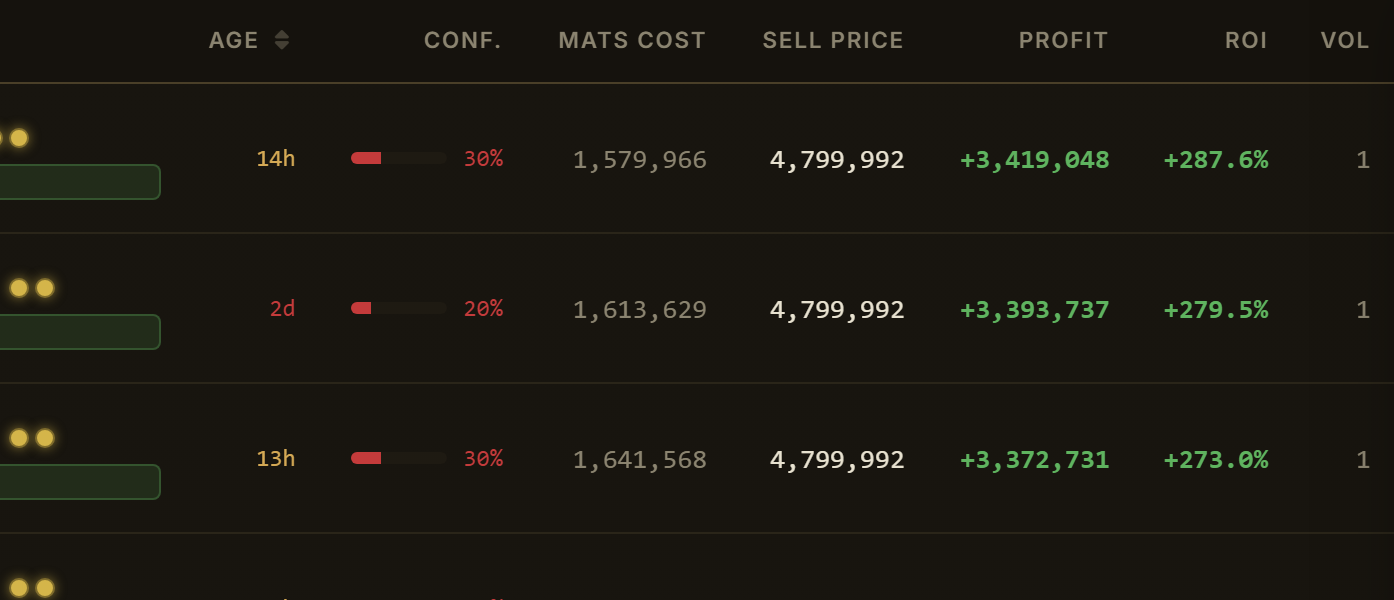
Every number shows its age
Each row carries the age of the stalest price used in its math
and a confidence score,
so you always know whether you are reading data from one minute ago or
one day ago. Nothing here is smoothed over: a tool that hides staleness
is a tool that costs you silver on the one craft you actually commit to.
The same rule governs this page: every claim on it is something the app
verifiably does.
Age, confidence, freshness, on every row, not in a footnote.
Every claim above has a longer answer
The guide covers all eleven calculators, the three advanced modes,
six months of chart history, and exactly where the numbers come from
limits stated plainly. Public, no login.
The Albion Online Data Project: a community network of players running
the market client. Coverage is as good as the contributors in that city
at that hour, which is exactly why every price on the site is
timestamped rather than presented as gospel.
How fresh are the numbers?
Prices stream in from the Data Project continuously, updates land in
batches about once a second. Every 5 minutes the server rebuilds all
results from them, and open pages swap to the new numbers
automatically. The 5-minute rebuild cadence is a deliberate trade:
recomputing ~1,000,000 combinations in one pass keeps every row's
math consistent and the servers lean. And every row shows the age of
its stalest price, so you never have to take "fresh" on faith.
Is this allowed?
It is a fan-made tool built on public market data. It reads prices; it
does not automate, modify or interact with the game client in any way.
Which servers are supported?
Europe, Americas and Asia: all three, swept independently.
What does it cost?
The calculators, craft planner, profit ledger and market price
lookups are free: permanently. A Premium
subscription ($6/month) adds real-time data freshness, a private
data feed and CSV export. Raw market data is never paywalled.